 Kent's Vim Page

Vim is Vi-IMproved, a free (charityware) vi text editor work-alike with many extensions and great features such as multi-level undo, multiple file windows and buffers, flexible insert mode (use the arrow keys to move while in insert mode), visual mode (execute commands on highlighted areas of text), block operators (operate on rectangular blocks of text), folding, and an online help system. Vim is well worth a try, even if you hate vi (try easy mode: vim -y or gvim -y), and especially if you love vi but would like to eliminate some of vi's limitations, such as limited line length or single-level undo.
If you don't know what "vi" is, my more generic vi Information & Resources page will give a brief introduction and some links to further sources of information.
I've come a long way down the vi trail since 1990...vi, xvi, elvis, vile, xvile, nvi, and now, Vim, which I use almost every day. I have found Vim to be a most useful, efficient, and enjoyable editor. Here is a screen shot (91K PNG) of how Vim 7.2.166 compiled with GTK GUI looks on my WinXP system (running Cygwin X) from gvim installed on my FreeBSD system. Vim has user-customizable color schemes. If you don't like the background, it can be easily changed--by default vim installs with a white background).
A huge plus with Vim for me is: I'm able to use the same version of Vim under Win10 and Unix, thus eliminating any jarring mental shifts that come from using editors with different interfaces when switching development platforms.
Vim is under active and ongoing development. Vim 8.2 is the most recent stable release. This new version (compared to Vim from the v4.6 era) offers customizable color syntax highlighting/coloring for many programming languages and filetypes, a choice of graphical interfaces (such as gvim on Unix using Athena, Motif, or GTK), pull-down menus, toolbar, folding, its own scripting language, user functions, viewing colorized differences between files, spell-checking, multi-byte printing, omni-completion for structs/classes/objects, highlighting the line the cursor is on, tabbed editing, persistent undo, concealable text in syntax highlighting, blowfish encryption of files, and the ability to include Perl, Python 2/3, MzScheme, TCL/TK, Lua, and/or Ruby as an interpreter that can be used to modify files in the editor.
You can find four examples here of how I've been using Vim [567].x's color syntax highlighting features on my Kent's Vim Syntax Files page. Note that none of these are official. In fact, if anyone uses SPSS statistical software as well as Vim and would like to take over maintainership of my SPSS highlighting definition for Vim, drop me a line. It would be nice to get this into the official distribution of Vim, but I don't use SPSS any longer and haven't had any opportunity to update and test sps.vim.
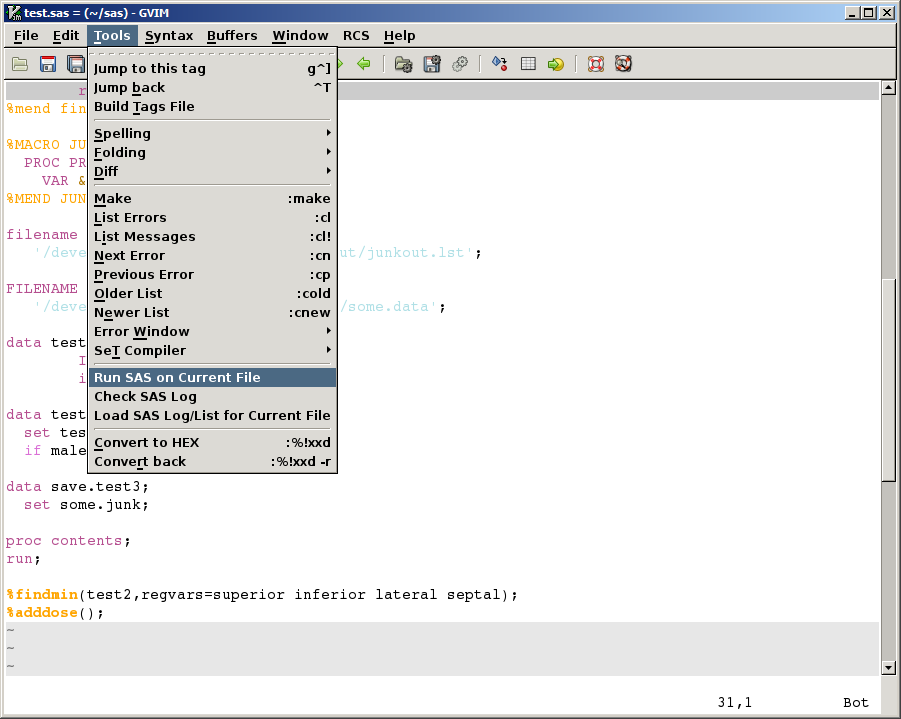
I've also put three Vim functions for programming SAS with Vim, with Tools menu integration, a simple log checking script, and an example of a wrapper script to add a filename to the Vim quickfix list here. The Tools menu with the SAS functions installed looks like this. If you program in SAS and use Vim, these functions may be worth a look and give you some ideas on how to set up Vim on your system.
Comments and suggestions about this Vim page are welcome.
--Kent Nassen, knassen AT umich DOT eee dee youHere are some links to further information about Vim.
The VIM Home Page
(http://www.vim.org/)
This site is the main repository for Vim-related information,
a SourceForge repository of Vim tips and scripts, including plugins
and color schemes. This site is the central place for
useful user-submitted scripts and tips for Vim. There are
hundreds tips! This is a definite must see for Vim users!
Downloading Vim
(http://vim.sf.net/download.php)
Where to find Vim for your system.
Vim Recipes
(http://vim.runpaint.org/)
Recipes for Vim usage in a Problem/Solution/Discussion format. Several
formats available including PDF, HTML, zipped, bzipped tarball. Latest
source is available on GitHub. Has a link to an Atom feed and Twitter.
Vim Tutorial on YouTube
(http://www.youtube.com/watch?v=71YTkxUNwmg)
Video tutorial on YouTube. Pause if it goes too fast and replay if you
missed something. Be sure to search YouTube for Vim content. There are
quite a few Vim-related videos there.
Vim on Wikipedia
(http://en.wikipedia.org/wiki/Vim_(text_editor)
Wikipedia's entry on Vim the text editor.
Dr. Chip's Vim Page
(http://www.drchip.org/astronaut/vim/)
Syntax highlighting files (including for TeX/LaTeX, Maple, and Lisp),
scripts, and spell-checking for Vim.
VimCasts
(http://vimcasts.org/)
Video tips and tutorials on Vim usage. Covers basic Vim usage as well as
how to use some useful plug-ins.
Vince Negri's Vim Patches
(http://vince.negri.googlepages.com/)
Conceal/Ownsyntax patches for vim 7.0.x and 6.4.x. See Vince's
explanation
which includes screen shots of how the patches affects Vim editing.
Cream
(http://cream.sourceforge.net/)
As the site says: "A modern configuration of the powerful and famous
Vim... Cream shapes Vim into an interface you probably already know
(sometimes called Common User Access). Whether you are writing emails or
developing large software applications, Cream saves you time and gets
you up and running quickly."
vi(1) Tips: Essential vi/vim Editing Skills
(http://devguide.net/)
A book by Jacek Artymiak for learning vi/vim quickly, using less confusing terminology,
illustrations, and step by step instructions for file operations, cursor
movement, and editing. Focuses on getting new vi users up to speed quickly
but does continue with more intermediate vi/vim usage. (Lublin, 2008, 101pp, illustrated).
See also: Amazon link
Hacking Vim
(http://www.packtpub.com/Vim/book)
The book "Hacking Vim: A cookbook to get the most out of the latest
Vim editor" by Kim Schulz (Packt Publishing, 2007, 210pp, illustrated)
provides a number of tips, hints, setup ideas, scripts, functions, and
ways of improving the Vim experience. There are many topics covered,
from heavy-duty Vim use for programming to cosmetic aspects of Vim
set up. Whether you will get enough out of the book to warrant its
$39.99 price tag (but see the Packt web page, there may be a discount)
depends on your current level of Vim usage, but from my
experience most Vim users will find something of use.
Beginner's Guide to Vi Improved (VIM)
(http://newbiedoc.sourceforge.net/text_editing/vim.html.en)
A short beginner's guide to using vim, with examples of set ups (vimrc) and maps.
Vim for MacOSX
(http://macvim.org/OSX/index.php)
Vim for MacOSX with Aqua (Carbon) interface.
Vim - Vi Improved (Claudio Fleiner)
(http://www.fleiner.com/vim/)
Information about Vim syntax highlighting (and quite a few vim syntax files), tips
on creating your own Vim syntax highlighting file, using "dead" keys, and make
with Vim.
Benji Fisher's Vim.org Profile
(http://www.vim.org/account/profile.php?user_id=92)
Get the matchit script here (lets you configure % to match regular expressions).
There are several other items here including aux2tags (generate LaTeX tags), word_complete,
and vimtips (startup Vim with a tip displayed).
Preben 'Peppe' Guldberg's Vim Page
(http://www.xs4all.nl/~peppe/vim/)
Vim files and bits
to answer questions from comp.editors, including how to enhance the
<C-A>/<C-X> incrementing functions in vim.
Vim User's mail list archives
(http://groups.yahoo.com/group/vim)
Archive at Yahoo!Groups for the vim@vim.org mail list.
Vim Developer's mail list archives
(http://groups.yahoo.com/group/vimdev)
Archive at Yahoo!Groups for the vimdev@vim.org Vim developers mail list.
Steve Oualline's book Vi IMproved -- VIM
(http://amazon.com/)
Steve Oualline's book about VIM was published in 2001: Vi
IMproved -- VIM by New Riders Publishing (can't seem to find
it at New Rider's site any longer). If you are new to VIM
or have been using VIM for a long time, you'll find something in this
book to improve your editing efficiency or usage. I know I did.
Order the Vim book via links (to Amazon) at this link and
help ICCF help orphans: http://iccf-holland.org/click5.html
Here is the link to a PDF version of the book.
Bram's unofficial Vim book errata page
(http://www.moolenaar.net/vim_errata.html)
A list of errors and annoyances in the first book about Vim.
Steve Oualline's Vim Cookbook page
(http://www.oualline.com/vim-cook.html)
It contains "short recipes for doing many simple and not so simple things in Vim".
Vim webring hub
(http://U.webring.com/hub?ring=vim&id=21&hub)
The hub for the Vim web ring...has links to all the sites in the ring.
Vim Webring
(http://u.webring.com/hub?ring=vim)
A score of sites, related to Vim, in the Webring scheme of navigation.
Jano's Vim Macro Page
(http://www.vanhemert.co.uk/vim/)
Approximately two dozen macros for Vim in the categories of Toys &
Entertainment (for example, a macro for creating text stereograms, and
the Tower of Hanoi macro), Documents & Languages (including macros for
C, HTML, and LaTex editing), and Miscellaneous (such as a file manager
macro).
Gary Johnson's Vim Page
(http://www.spocom.com/users/gjohnson/vim/)
Provides the tidy.vim script, which uses the HTML Tidy program
(http://www.w3.org/People/Raggett/tidy/)
to report errors in HTML code.
Luc Hermitte's Vim Page
(http://hermitte.free.fr/vim/)
A collection of general purpose vim macros and filetype plugins.
Swaroop C H's A Byte of Vim Book
(http://www.swaroopch.com/notes/Vim)
A free on-line book for learning Vim.
How to Get the Most Out of Vim
(http://networking.ringofsaturn.com/Unix/howtogetmostoutofvim.php)
Goes over how to set up Vim to help with programming tasks, including
using tags, omnicompletion, and the minibufexplorer plugin.
[The screen shots above were grabbed while the application was running under
XFree86 and the
FVWM-95
window manager.
 Back to Kent's Home Page
This page has been visited times since December 26, 1997.